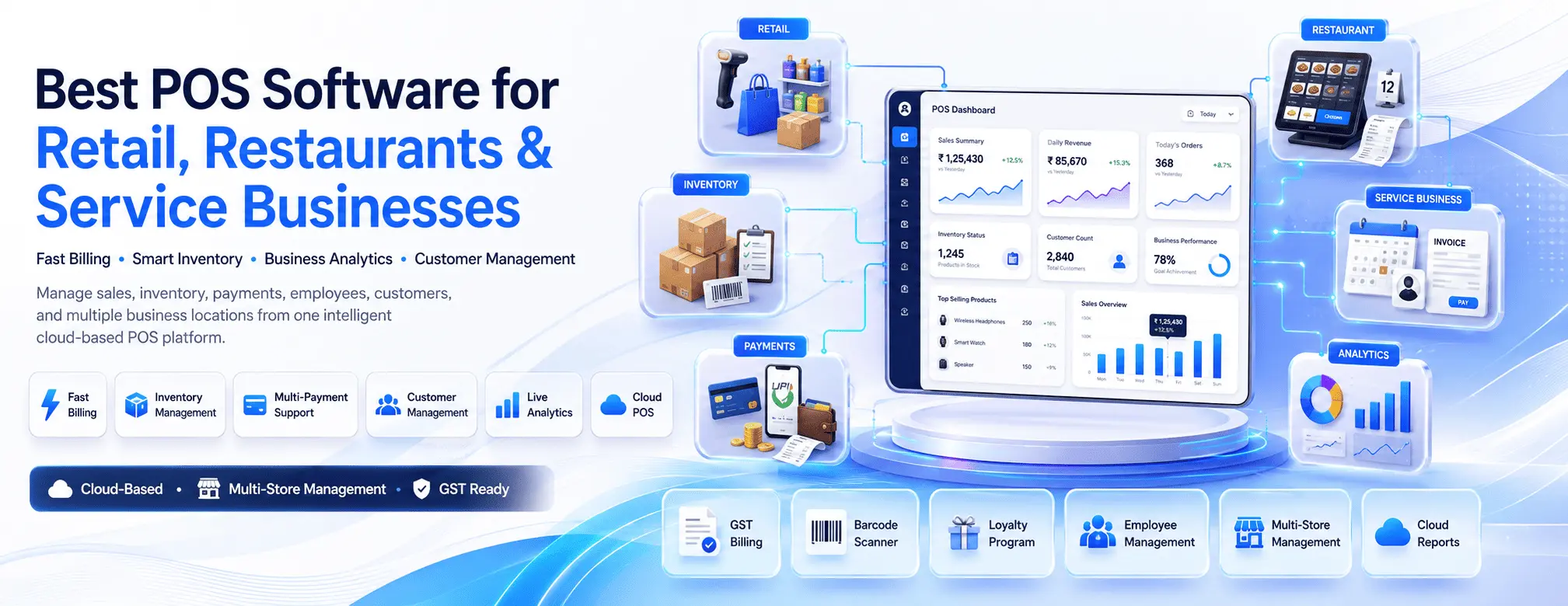
Best POS Software for Retail, Restaurants, and Service Businesses

MLGLOBTECH
Jul 26, 2026
Running a successful business today requires more than simply processing sales. Whether you own a retail store, restaurant, salon, pharmacy, or service-based business, managing inventory, customers, payments, employees, and reports efficiently is essential for growth.
This is where Point of Sale (POS) Software becomes an indispensable business tool.
Modern POS software goes beyond billing. It helps businesses streamline operations, improve customer experience, monitor sales in real time, and make data-driven decisions.
In this guide, we'll explore the best POS software features, industry-specific benefits, and how to choose the right solution for your business.
What is POS Software?
A Point of Sale (POS) Software is a digital system that allows businesses to process customer transactions while managing multiple business operations from a single platform.
Unlike traditional cash registers, today's POS systems integrate sales, inventory, customer management, employee tracking, reporting, and payment processing into one centralized solution.
Businesses across industries rely on POS software to:
Process faster payments
Manage inventory automatically
Track daily sales
Generate invoices
Monitor employee performance
Improve customer satisfaction
Reduce manual errors
Why Every Business Needs POS Software
No matter the size of your business, manual billing and inventory management consume valuable time and often lead to costly mistakes.
A smart POS solution helps automate repetitive tasks while giving business owners complete visibility into daily operations.
Major benefits include:
Faster checkout process
Improved inventory accuracy
Real-time business insights
Better customer relationship management
Secure payment processing
Reduced operational costs
Easy staff management
Multi-location business support
Businesses using modern POS systems often experience improved efficiency, better customer retention, and increased profitability.
Best POS Software for Retail Businesses
Retail stores deal with thousands of products, inventory updates, customer purchases, and seasonal promotions.
A retail POS system simplifies every aspect of store management.
Essential Features
Inventory Management
Track stock levels automatically after every sale.
Benefits include:
Low stock alerts
Barcode scanning
Product categorization
Batch tracking
Stock transfers
Customer Management
Maintain customer purchase history to offer personalized promotions.
Features include:
Customer profiles
Loyalty programs
Membership discounts
Purchase history
Reward points
Sales Analytics
Monitor:
Daily sales
Monthly revenue
Best-selling products
Slow-moving inventory
Profit margins
These insights help retailers make smarter purchasing decisions.
Best POS Software for Restaurants
Restaurants require speed, accuracy, and efficient order management.
Restaurant POS software helps reduce waiting times while improving kitchen coordination.
Key Restaurant Features
Table Management
Handle:
Table reservations
Table occupancy
Split billing
Table transfers
Kitchen Order Display
Orders instantly reach the kitchen, minimizing communication errors.
Benefits include:
Faster food preparation
Reduced mistakes
Better workflow
Online Ordering Integration
Modern restaurant POS systems support:
Food delivery
Online ordering
QR menu ordering
Takeaway orders
Menu Management
Quickly update:
Prices
Combo meals
Seasonal menus
Special offers
Without changing printed menus repeatedly.
Best POS Software for Service Businesses
Service businesses such as salons, spas, repair shops, clinics, gyms, and consultancies also benefit greatly from POS software.
These businesses require appointment scheduling along with billing.
Must-Have Features
Appointment Scheduling
Manage:
Online bookings
Staff availability
Calendar management
Customer reminders
Customer Database
Maintain complete client records including:
Service history
Preferences
Membership plans
Payment history
Invoice Management
Generate professional invoices instantly while supporting multiple payment methods.
Staff Performance Tracking
Monitor:
Completed appointments
Revenue generated
Attendance
Productivity
Features to Look for in the Best POS Software
Choosing the right POS software depends on your business requirements.
Look for these essential capabilities.
1.Fast Billing
A POS should process transactions within seconds while reducing customer waiting time.
2. Inventory Control
Real-time inventory updates prevent stock shortages and overstocking.
3. Multi-Payment Support
Support for:
Credit Cards
Debit Cards
UPI
Mobile Wallets
Cash
Gift Cards
4. Barcode Scanner Integration
Quick product identification speeds up billing and reduces human errors.
5. Employee Management
Track:
Login activities
Sales performance
Shift timing
User permissions
6. GST & Tax Compliance
Automatically calculate taxes and generate GST-compliant invoices.
7. Customer Loyalty Programs
Reward repeat customers through:
Discounts
Cashback
Membership plans
Reward points
8. Real-Time Reports
View reports including:
Sales reports
Inventory reports
Tax reports
Profit analysis
Customer insights
9. Cloud-Based Access
Cloud POS software allows business owners to monitor operations from anywhere using smartphones or laptops.
10. Multi-Store Management
Businesses operating multiple outlets can manage everything from one dashboard.
Benefits of Cloud-Based POS Software
Cloud technology has transformed modern POS systems.
Advantages include:
Automatic backups
Secure data storage
Remote access
Easy software updates
Lower maintenance costs
Scalable infrastructure
Cloud POS systems are particularly useful for growing businesses planning to expand across multiple locations.
Industries That Benefit from POS Software
Modern POS software serves numerous industries, including:
Retail Stores
Supermarkets
Restaurants
Cafés
Food Trucks
Salons
Spas
Medical Stores
Pharmacies
Electronics Shops
Garment Stores
Grocery Stores
Fitness Centers
Repair Shops
Service Centers
Clinics
Jewelry Stores
Bookstores
Every industry benefits from automation, better reporting, and streamlined operations.
How to Choose the Right POS Software
Before investing in a POS solution, consider the following factors:
Business Size
Select software that supports your current needs while allowing future growth.
Ease of Use
Employees should be able to learn the system quickly with minimal training.
Customization
Every business operates differently. Choose software that can be customized according to your workflows.
Integration
Ensure compatibility with:
Accounting software
Payment gateways
Barcode scanners
Printers
CRM systems
E-commerce platforms
Customer Support
Reliable technical support minimizes downtime and keeps your business running smoothly.
Why Choose MLGLOBTECH POS Software?
If you're looking for a scalable and feature-rich POS solution, MLGLOBTECH POS Software is designed to meet the needs of retail stores, restaurants, and service businesses.
Key highlights include:
Fast and secure billing
Real-time inventory management
Barcode integration
GST-compliant invoicing
Customer loyalty management
Employee access control
Multi-store management
Advanced sales analytics
Cloud-enabled reporting
Customizable dashboards
Secure data management
Easy integration with business tools
Whether you're managing a single outlet or multiple business locations, MLGLOBTECH's POS solution helps simplify operations, improve efficiency, and enhance customer satisfaction.
Conclusion
Investing in the best POS software is one of the smartest decisions a business can make. A modern POS system not only speeds up transactions but also provides valuable insights into sales, inventory, customer behavior, and employee performance.
Whether you operate a retail store, restaurant, or service-based business, choosing the right POS software will help you automate operations, reduce errors, increase productivity, and deliver an exceptional customer experience.
As businesses continue to embrace digital transformation, a powerful POS solution becomes the foundation for sustainable growth. Choose a scalable, secure, and feature-rich system like MLGLOBTECH POS Software to streamline your operations and stay ahead of the competition.
Frequently Asked Questions (FAQs)
1. What is the best POS software for retail businesses?
The best POS software for retail businesses includes features such as inventory management, barcode scanning, customer loyalty programs, sales reporting, and multi-store management to streamline operations and improve efficiency.
2. Can POS software be used for restaurants?
Yes. Restaurant POS software supports table management, kitchen order displays, online ordering, menu management, split billing, and payment processing, making restaurant operations faster and more accurate.
3. Is cloud-based POS software better than traditional POS?
Cloud-based POS software offers remote access, automatic backups, real-time reporting, and easy scalability, making it a preferred choice for modern businesses compared to traditional on-premise systems.
4. What features should I look for in POS software?
Look for features such as fast billing, inventory management, barcode integration, GST invoicing, customer management, employee tracking, real-time analytics, multi-payment support, and cloud accessibility.
5. Which businesses can benefit from POS software?
POS software is ideal for retail stores, supermarkets, restaurants, cafés, salons, spas, pharmacies, clinics, repair shops, fitness centers, grocery stores, and many other service-based businesses.
Primary SEO Keywords: Best POS Software, POS Software for Retail, Restaurant POS Software, POS System, Point of Sale Software, Cloud POS Software.
Secondary Keywords: Retail POS System, Service Business POS Software, Inventory Management Software, Billing Software, POS Solution, Multi-Store POS, GST Billing Software, Customer Loyalty Software, Business Management Software.