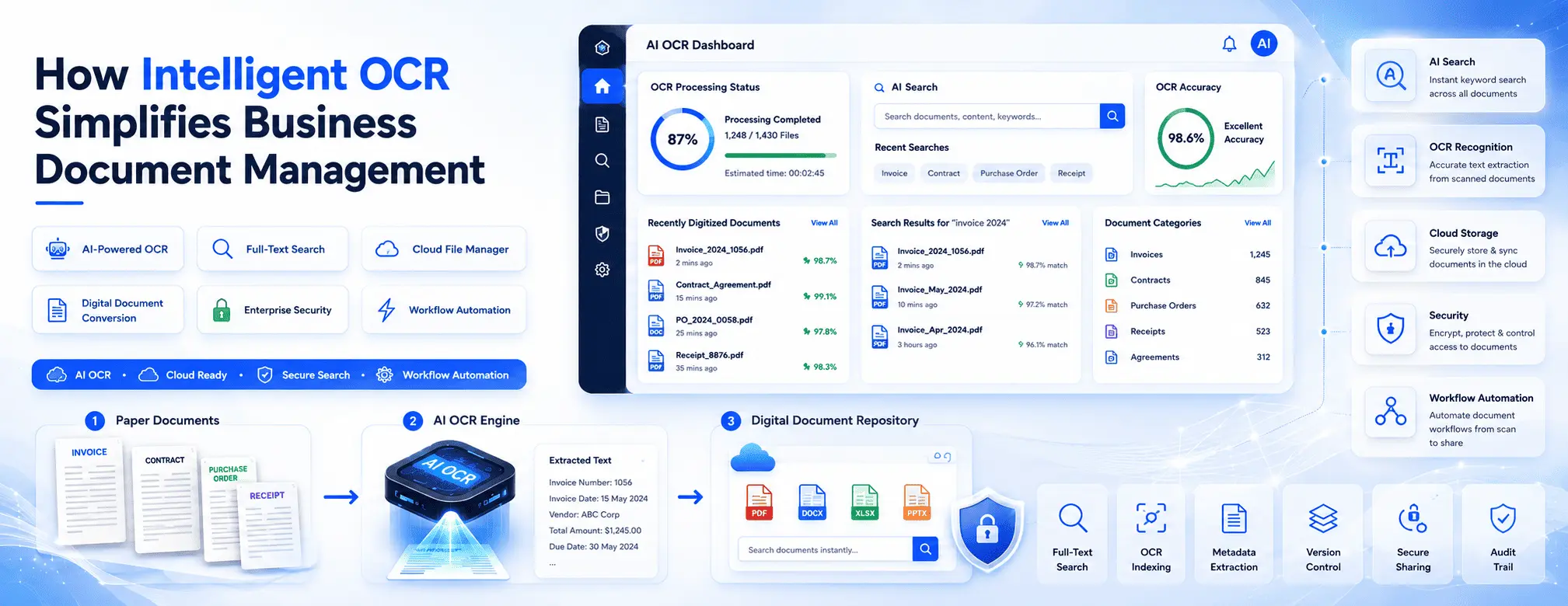
How Intelligent OCR Simplifies Business Document Management

MLGLOBTECH
Aug 9, 2026
In today's digital business environment, organizations handle thousands of documents every day, including invoices, contracts, purchase orders, employee records, reports, and customer files. Managing these documents manually is not only time-consuming but also increases the risk of errors, misplaced files, and compliance issues.
This is where Intelligent Optical Character Recognition (OCR) transforms document management. By combining OCR technology with a modern cloud file management system, businesses can convert scanned documents and images into searchable, editable, and organized digital files.
Whether you're a small business or a large enterprise, Intelligent OCR helps streamline document workflows, improve productivity, and make information instantly accessible.
What Is Intelligent OCR?
Optical Character Recognition (OCR) is a technology that extracts text from scanned documents, PDFs, and images. Intelligent OCR goes a step further by using advanced algorithms and AI to accurately recognize printed and handwritten text, classify documents, and capture important information automatically.
Instead of storing documents as static images, Intelligent OCR converts them into searchable digital files, making document retrieval fast and effortless.
Common Document Management Challenges
Many businesses still struggle with traditional document management processes. Common challenges include:
Time-consuming manual data entry
Difficulty finding specific documents
Lost or misplaced files
Paper-based document storage
Duplicate documents
Limited collaboration among teams
Security and compliance concerns
High operational costs
As organizations grow, these problems become more significant, reducing efficiency and slowing decision-making.
How Intelligent OCR Simplifies Document Management
1. Instantly Converts Paper Documents into Digital Files
Businesses receive documents from multiple sources, including paper records, scanned invoices, contracts, and receipts.
Intelligent OCR automatically extracts text from these documents and converts them into searchable digital files without manual typing.
Benefits include:
Reduced paperwork
Faster digitization
Improved document organization
Lower storage costs
2. Makes Every Document Searchable
One of the biggest advantages of OCR is full-text search.
Instead of manually browsing folders, employees can simply search for:
Customer names
Invoice numbers
Contract IDs
Dates
Keywords
Product names
Documents can be located within seconds, significantly improving productivity.
3. Eliminates Manual Data Entry
Manual data entry consumes valuable employee time and often leads to mistakes.
Intelligent OCR automatically captures important information such as:
Customer information
Invoice amounts
Purchase order numbers
Vendor details
Tax information
Reference numbers
Employees can spend more time on business-critical tasks instead of repetitive administrative work.
4. Improves Accuracy
Human errors are unavoidable when processing hundreds of documents every day.
Intelligent OCR reduces errors by automatically recognizing text and extracting information consistently.
This improves:
Data accuracy
Financial reporting
Customer records
Business operations
Compliance documentation
5. Enhances Team Collaboration
Modern businesses require employees to collaborate across departments and locations.
Cloud-based file management systems integrated with Intelligent OCR allow teams to:
Access files securely from anywhere
Share documents instantly
Collaborate in real time
Control document versions
Avoid duplicate files
This creates a more connected and productive workplace.
6. Strengthens Document Security
Business documents often contain confidential information.
An intelligent document management solution provides advanced security features such as:
Role-based access control
Permission management
File encryption
Activity tracking
Audit logs
Secure sharing
These features help protect sensitive business information while ensuring only authorized users can access documents.
7. Supports Regulatory Compliance
Industries such as healthcare, finance, manufacturing, legal services, and government must comply with strict document retention policies.
Intelligent OCR simplifies compliance by:
Maintaining searchable digital records
Tracking document history
Supporting audit requirements
Improving record retention
Reducing compliance risks
Organizations can quickly retrieve documents during audits without searching through physical files.
8. Speeds Up Business Processes
Document-intensive workflows often slow down business operations.
OCR automates routine processes like:
Invoice processing
Employee onboarding
Customer documentation
Contract management
Vendor approvals
Purchase order processing
Automation reduces delays and helps employees complete tasks much faster.
Industries That Benefit from Intelligent OCR
Almost every industry can improve efficiency using OCR-powered document management.
Healthcare
Hospitals and clinics can digitize patient records, prescriptions, medical reports, and insurance documents for faster access and improved patient care.
Finance
Banks and financial institutions use OCR to process loan applications, invoices, tax forms, and customer records while improving compliance.
Legal Firms
Law firms manage thousands of contracts and legal documents. OCR enables quick document search and retrieval, saving valuable time.
Human Resources
HR teams can securely organize employee files, resumes, payroll documents, and compliance records.
Manufacturing
Manufacturers can digitize quality reports, purchase orders, supplier documents, and operational records for improved efficiency.
Education
Educational institutions can organize student records, admissions documents, certificates, and administrative files with ease.
Key Features to Look for in an OCR-Based File Management System
When choosing a Cloud File Manager with Intelligent OCR, look for features such as:
Intelligent OCR text recognition
Full-text document search
Secure cloud storage
Folder and file organization
Version control
User access management
Document sharing
Activity logs
Mobile accessibility
Role-based permissions
Backup and recovery
Integration with existing business applications
These capabilities ensure your document management system is scalable, secure, and easy to use.
Why Cloud File Management Makes OCR Even Better
Combining OCR with cloud technology offers even greater advantages.
Cloud-based document management enables businesses to:
Access documents from anywhere
Support remote and hybrid teams
Eliminate dependency on local storage
Improve disaster recovery
Scale storage as the business grows
Reduce IT infrastructure costs
Employees can securely access business documents from desktops, laptops, tablets, or mobile devices without compromising security.

Why Choose MLGLOBTECH Cloud File Manager with OCR?
MLGLOBTECH Cloud File Manager with OCR is designed to help businesses digitize, organize, search, and securely manage documents from one centralized platform.
Key benefits include:
Intelligent OCR-powered document search
Secure cloud-based file storage
Advanced permission management
Easy file sharing and collaboration
Fast document retrieval
Version control
Scalable storage for growing businesses
User-friendly interface
Reliable security and data protection
Whether your organization manages hundreds or millions of documents, the platform helps simplify workflows while improving productivity and operational efficiency.
Conclusion
Efficient document management is essential for every modern business. Manual filing systems and paper-based processes slow productivity, increase costs, and create unnecessary risks.
Intelligent OCR changes the way businesses handle documents by converting paper files into searchable digital records, eliminating manual data entry, improving accuracy, and enabling instant access to critical information.
Frequently Asked Questions (FAQs)
1. What is Intelligent OCR, and how does it work?
Intelligent OCR (Optical Character Recognition) is a technology that converts scanned documents, PDFs, and images into searchable and editable digital text. It uses advanced recognition algorithms to accurately extract information, making document storage, retrieval, and management much more efficient.
2. How does Intelligent OCR improve business document management?
Intelligent OCR automates data extraction, eliminates manual data entry, enables full-text document search, improves accuracy, and helps businesses organize and retrieve files quickly. This reduces administrative work and increases overall productivity.
3. Which businesses can benefit from a Cloud File Manager with OCR?
A Cloud File Manager with OCR is beneficial for businesses of all sizes and industries, including healthcare, finance, legal, manufacturing, education, human resources, logistics, and government organizations that manage large volumes of documents.
4. Is a Cloud File Manager with OCR secure for storing confidential documents?
Yes. Modern Cloud File Managers provide enterprise-grade security features such as role-based access control, file encryption, audit logs, version control, secure file sharing, and automated backups to protect sensitive business data.
5. Why should businesses choose MLGLOBTECH's Cloud File Manager with OCR?
MLGLOBTECH Cloud File Manager with OCR offers intelligent document search, secure cloud storage, advanced user permissions, version control, easy file sharing, and centralized document management. It helps businesses streamline workflows, improve collaboration, reduce paperwork, and manage documents more efficiently from a single platform.