How to Choose the Right Document Management System for Your Business

MLGLOBTECH
Aug 13, 2026
In today's digital business environment, organizations handle hundreds or even thousands of documents every day. From invoices and contracts to employee records, reports, customer files, and compliance documents, managing information efficiently has become essential.
A Document Management System (DMS) helps businesses store, organize, secure, search, and manage digital documents from a centralized platform. However, with many document management solutions available, choosing the right system can be challenging.
The right solution should do more than simply store files. It should improve productivity, strengthen document security, automate workflows, support collaboration, and grow with your business.
What Is a Document Management System?
A Document Management System is software designed to digitally manage the complete lifecycle of business documents. It allows organizations to upload, store, organize, search, share, edit, track, and archive documents from a centralized platform.
Instead of relying on paper files, scattered folders, emails, or multiple storage systems, businesses can manage their documents through a structured digital environment.
Modern document management software may also include features such as:
Document indexing and categorization
Advanced document search
Version control
User access permissions
Document workflow automation
Audit trails
OCR and text recognition
Digital document sharing
Document approval workflows
Backup and recovery
Reporting and analytics
These capabilities can help businesses reduce manual work while improving control over important information.
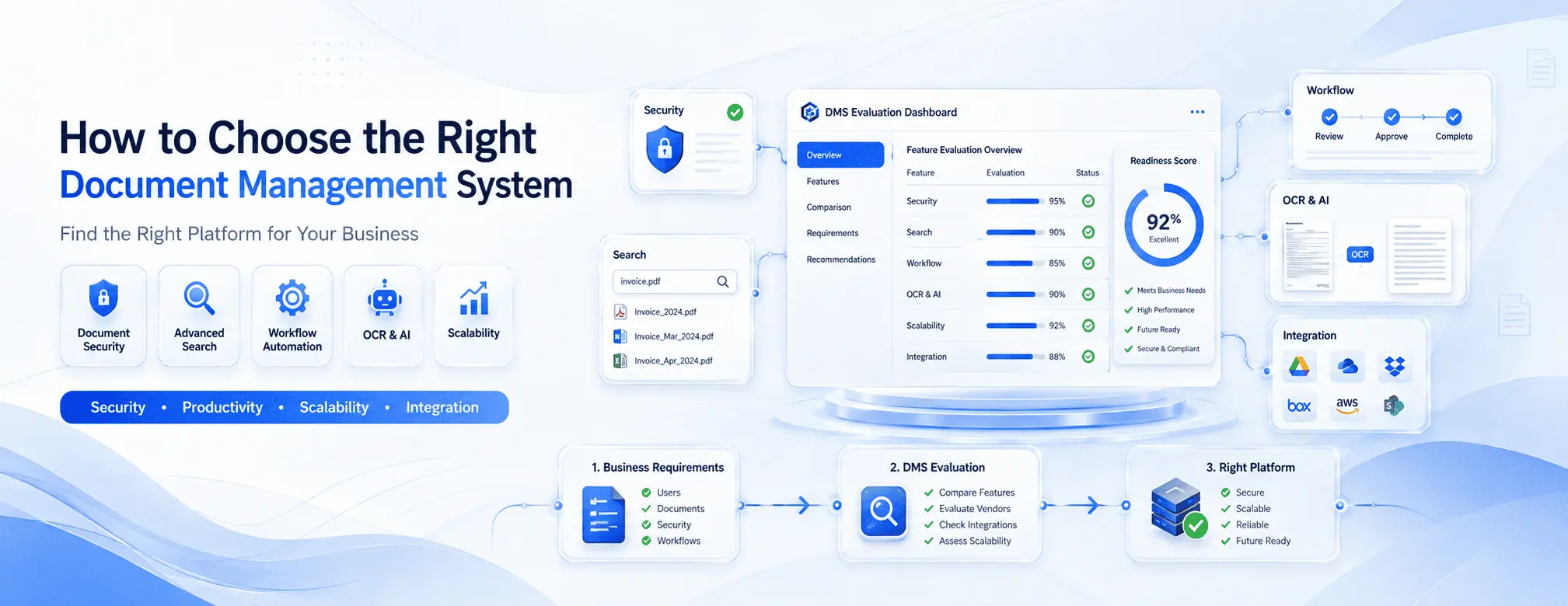
1. Identify Your Business Requirements
Before comparing different document management systems, identify your organization's specific requirements.
Start by asking:
How many documents does your business manage?
What types of documents do you store?
How many employees need access?
Do different departments require different permissions?
Do you need document approval workflows?
Do you need OCR for scanned documents?
Do you require compliance and audit tracking?
Do employees need remote access?
Do you need integration with existing business applications?
For example, an organization that primarily stores invoices may have different requirements from an enterprise managing contracts, employee records, quality documents, and compliance files.
Understanding your requirements first will make it easier to select a system that provides the right features without unnecessary complexity.
2. Look for Strong Document Organization and Search
One of the biggest advantages of a DMS is the ability to find documents quickly.
A good system should allow users to organize documents using folders, categories, metadata, tags, and document types. More advanced systems can provide powerful search capabilities that allow users to locate documents using keywords or specific information.
For businesses managing thousands of files, efficient search can save significant time.
Look for features such as:
Full-text search
Metadata-based search
Document tagging
Advanced filters
Keyword search
OCR-based search
Custom document categories
The easier it is for employees to find information, the more productive your organization can become.
3. Prioritize Document Security
Business documents often contain confidential information. Therefore, document security should be one of the most important considerations when selecting document management software.
Look for a system that provides role-based access control and allows administrators to determine who can view, edit, download, or share specific documents.
Important security capabilities may include:
User authentication
Role-based permissions
Access control
Secure document sharing
Activity tracking
Audit trails
Data backup
Encryption
Session management
A secure Document Management System should help organizations maintain control over sensitive information while reducing the risk of unauthorized access.
4. Consider Version Control
Employees frequently update documents. Without proper version control, multiple copies of the same file can create confusion.
For example, different employees may save files such as:
Contract_Final.docx
Contract_Final_New.docx
Contract_Final_Updated.docx
This approach makes it difficult to determine which version is actually correct.
A document management system with version control keeps track of document changes and helps users access previous versions when necessary.
This is particularly valuable for contracts, policies, technical documents, quality documents, and other files that are frequently revised.
5. Evaluate Workflow Automation
A modern DMS should help automate repetitive document-related processes.
For example, a company may have a workflow where an employee uploads a document, a manager reviews it, another department approves it, and the final version is archived.
Instead of managing these steps manually through email, workflow automation can route documents to the appropriate users automatically.
Useful workflow features include:
Document approval
Review processes
Automated notifications
Task assignments
Approval levels
Workflow tracking
Automated document routing
Workflow automation can reduce delays and improve accountability.
6. Check for OCR and Intelligent Document Processing
If your business still receives scanned documents, invoices, forms, or paper-based records, OCR can be an important feature.
Optical Character Recognition (OCR) converts text from scanned documents or images into searchable digital information.
For example, instead of manually reading a scanned invoice, an OCR-enabled system can recognize its text and make the document searchable.
OCR can help businesses:
Convert scanned documents into searchable files
Reduce manual data entry
Improve document accessibility
Extract useful information
Digitize paper-based records
For organizations processing large volumes of documents, OCR can significantly improve document management efficiency.
7. Choose a Scalable Solution
Your document management requirements may change as your business grows.
A system that works for a small organization may not be sufficient when you have more users, departments, documents, or locations.
Before selecting a platform, consider:
Maximum number of users
Storage capacity
Department-level access
Multi-location support
Performance
Customization options
Integration capabilities
Future expansion
Choosing a scalable solution can prevent the need to replace your document management platform as your organization grows.
8. Consider Integration Capabilities
Your DMS should ideally work with the other systems your business already uses.
Integration can help create a connected digital workflow between document management and other business applications.
Depending on your requirements, you may need integrations with:
CRM systems
ERP software
Accounting applications
HR systems
Email platforms
Cloud storage
Business portals
Identity and authentication systems
Good integration capabilities can reduce duplicate data entry and improve operational efficiency.
9. Compare Customization and Deployment Options
Every business has different processes. Therefore, customization can be an important factor.
Some organizations may need custom workflows, document categories, user roles, branding, integrations, or business-specific modules.
You should also evaluate whether you prefer a cloud-based, on-premise, or self-hosted deployment model.
Consider factors such as:
Data ownership
Security requirements
Customization
IT infrastructure
Maintenance
Accessibility
Total cost of ownership
The best deployment option depends on your organization's technical, financial, and operational requirements.
10. Evaluate Total Cost and ROI
Price is important, but it should not be the only deciding factor.
Instead of looking only at the initial software cost, consider the overall value the system can provide.
A Document Management System can potentially reduce costs associated with:
Paper and printing
Physical document storage
Manual data entry
Document retrieval
Administrative work
Duplicate files
Workflow delays
Evaluate the total cost of ownership, including implementation, customization, support, maintenance, storage, and future upgrades.
A system that costs slightly more but saves significant employee time may provide better long-term ROI.
11. Test the Platform Before Making a Decision
Before purchasing a Document Management System, request a demonstration or trial whenever possible.
During the demo, test real business scenarios rather than simply reviewing feature lists.
For example, check how easily you can:
Upload a document.
Categorize and organize it.
Search for specific information.
Assign permissions.
Create document versions.
Send a document for approval.
Track document activity.
Retrieve previous versions.
Also evaluate the user interface. A powerful system will not deliver maximum value if employees find it difficult to use.
Conclusion
Choosing the right Document Management System is an important decision for businesses looking to improve productivity, security, collaboration, and document control.
The ideal solution should match your current requirements while providing enough flexibility to support future growth. Key factors to evaluate include document organization, search, security, version control, workflow automation, OCR, scalability, integrations, customization, deployment options, and total cost of ownership.
If you're looking for a secure, scalable, and customizable Document Management System, MLGLOBTECH provides a solution designed to help businesses manage documents efficiently, automate workflows, improve accessibility, and maintain better control over business information.
Frequently Asked Questions FAQs
1. What is a Document Management System?
A Document Management System is software that helps businesses digitally store, organize, search, secure, share, and manage documents from a centralized platform.
2. What features should a good Document Management System have?
Important features include document search, access control, version control, workflow automation, OCR, document sharing, audit trails, backup, and reporting.
3. How does document management software improve business productivity?
It reduces manual document handling, makes files easier to find, automates approval workflows, and allows employees to access information more efficiently.
4. Is OCR important in a Document Management System?
OCR is especially useful for businesses managing scanned documents because it converts text from images and scanned files into searchable digital content.
5. How do I choose the best Document Management System for my business?
Consider your document volume, users, security requirements, workflow needs, integrations, scalability, customization, deployment options, and total cost of ownership.