Stop Sending Your Entire Knowledge Base to AI: How Embeddings Made Our Chatbot More Efficient

MLGLOBTECH
Aug 21, 2026
AI chatbots are becoming much more useful than the simple question-and-answer bots we were used to a few years ago.
Today, a business chatbot can understand product documentation, answer customer questions, search company knowledge, assist employees, provide support, and even trigger business workflows.
But there is an interesting engineering problem behind all of this:
What happens when your chatbot has a very large knowledge base?
Imagine a company has hundreds or thousands of documents containing product information, FAQs, manuals, policies, support articles, and internal knowledge.
Now a customer asks one simple question.
Should we send the entire knowledge base to the AI model just so it can find the answer?
Obviously not.
That was one of the questions we wanted to solve while building our AI chatbot.
Our approach was simple:
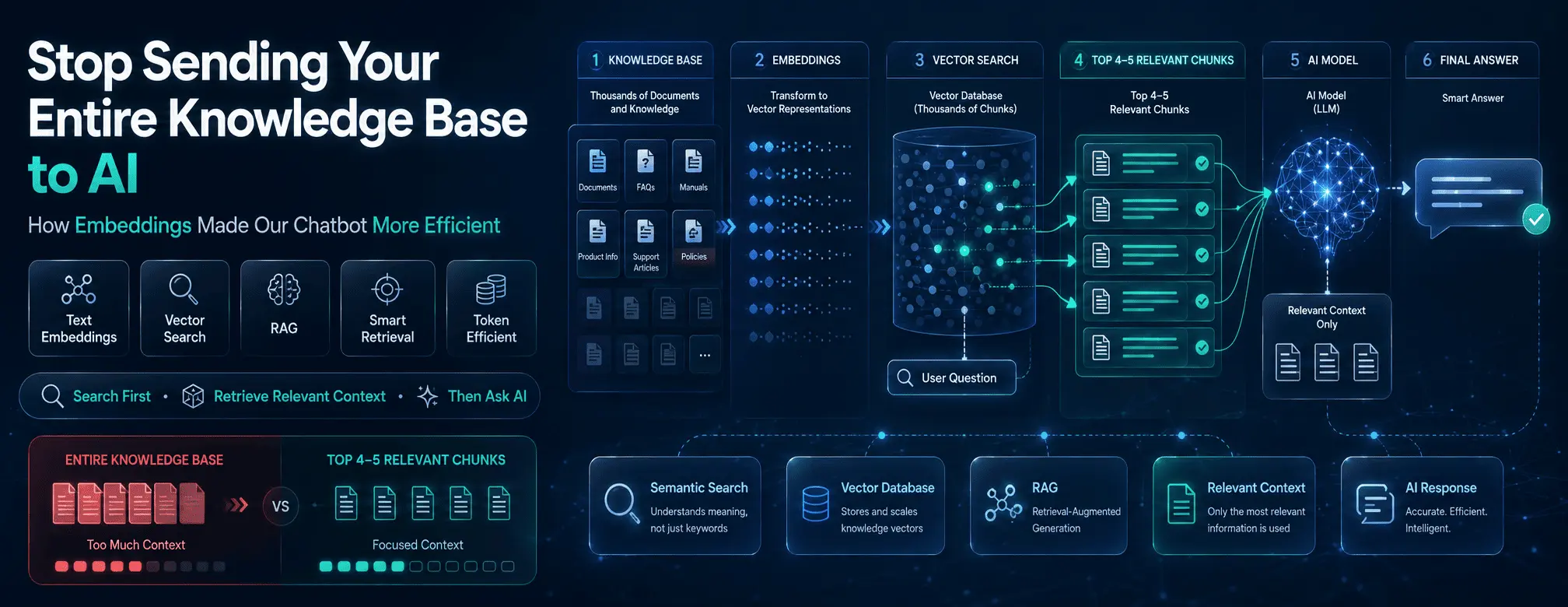
Instead of sending the entire knowledge base to the AI model, we search the knowledge base first and send only the most relevant information to the model.
We achieved this using text embeddings, vector search, and Retrieval-Augmented Generation (RAG).
In our implementation, the chatbot retrieves the top 4–5 most relevant knowledge chunks and uses those chunks as context when generating the final answer.
This article explains how that works.
The Problem With Sending Everything to AI
Let's start with a simple example.
Imagine our knowledge base contains information about:
Products
Pricing
Features
Documentation
User guides
Support procedures
FAQs
Company policies
Integrations
Troubleshooting
Internal processes
Now a user asks:
"How can I reset my password?"
The answer might exist in just one support article.
But a naive implementation could send something like:
System Instructions
+
Entire Conversation
+
Entire Knowledge Base
+
User Question
The AI model then has to process all of that information to answer one relatively simple question.
This creates several problems.
More input tokens
The larger the prompt, the more input tokens the model needs to process.
Higher cost
Depending on the model and usage volume, processing unnecessary context can increase AI API costs.
More processing
The model has to work through information that may have nothing to do with the current question.
More noise
Irrelevant information can make it harder for the model to focus on the correct context.
And there is an even bigger issue.
As your knowledge base grows, this approach becomes increasingly difficult to scale.
So we asked ourselves:
What if we could search the knowledge base before asking the AI to answer?
That question led us to embeddings and vector search.
The Basic Idea
The architecture we use can be summarized very simply:
Large Knowledge Base
        ↓
Split Into Chunks
        ↓
Generate Embeddings
        ↓
Store in Vector Database
        ↓
        ...
        ↓
User Asks Question
        ↓
Generate Question Embedding
        ↓
Search Vector Database
        ↓
Find Best Matching Chunks
        ↓
Select Top 4–5 Chunks
        ↓
Send Relevant Context to AI
        ↓
Generate Answer
The important part is what happens in the middle.
The AI model does not need to see the entire knowledge base.
It only needs the information that is relevant to the question.
A Quick Explanation of Embeddings
If you've worked with AI applications, you've probably heard the term embedding.
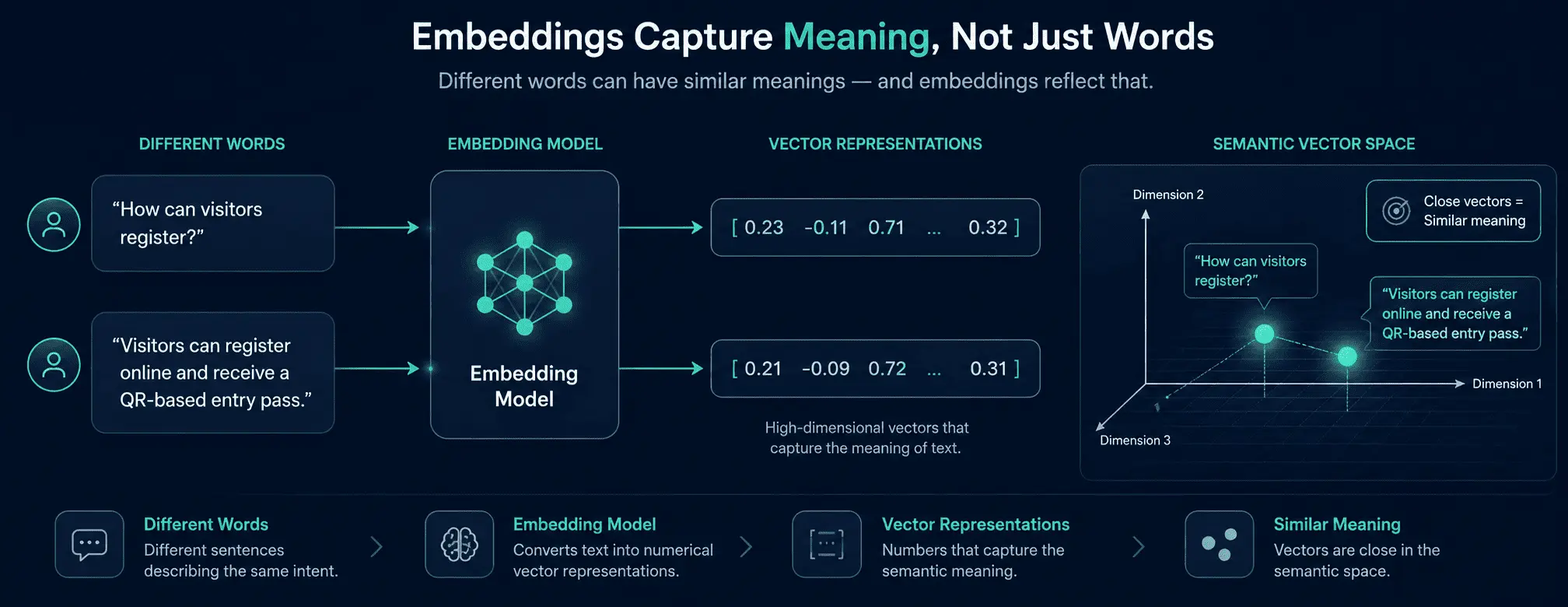
An embedding is essentially a numerical representation of text that captures semantic meaning.
Let's take two sentences:
"How can visitors register for an exhibition?"
and:
"Visitors can complete online registration and receive a QR-based entry pass."
The wording isn't identical.
But semantically, these two pieces of content are closely related.
An embedding model converts each piece of text into a vector representation.
Conceptually:
Question
"How can visitors register?"
        ↓
Embedding Model
        ↓
[0.21, -0.14, 0.82, 0.31, ...]
And:
Knowledge
"Visitors can register online..."
        ↓
Embedding Model
        ↓
[0.19, -0.12, 0.80, 0.34, ...]
The vectors can then be compared using a similarity calculation.
The closer the representations are, the more semantically related the pieces of content are likely to be.
This is what makes semantic search possible.
Step 1: Preparing Our Knowledge Base
Before the chatbot can answer questions, we need to prepare the knowledge.
Our knowledge can come from different sources, such as:
Documents
FAQs
Product information
Support articles
Manuals
Policies
Website content
Internal business knowledge
We don't treat all of this information as one giant block.
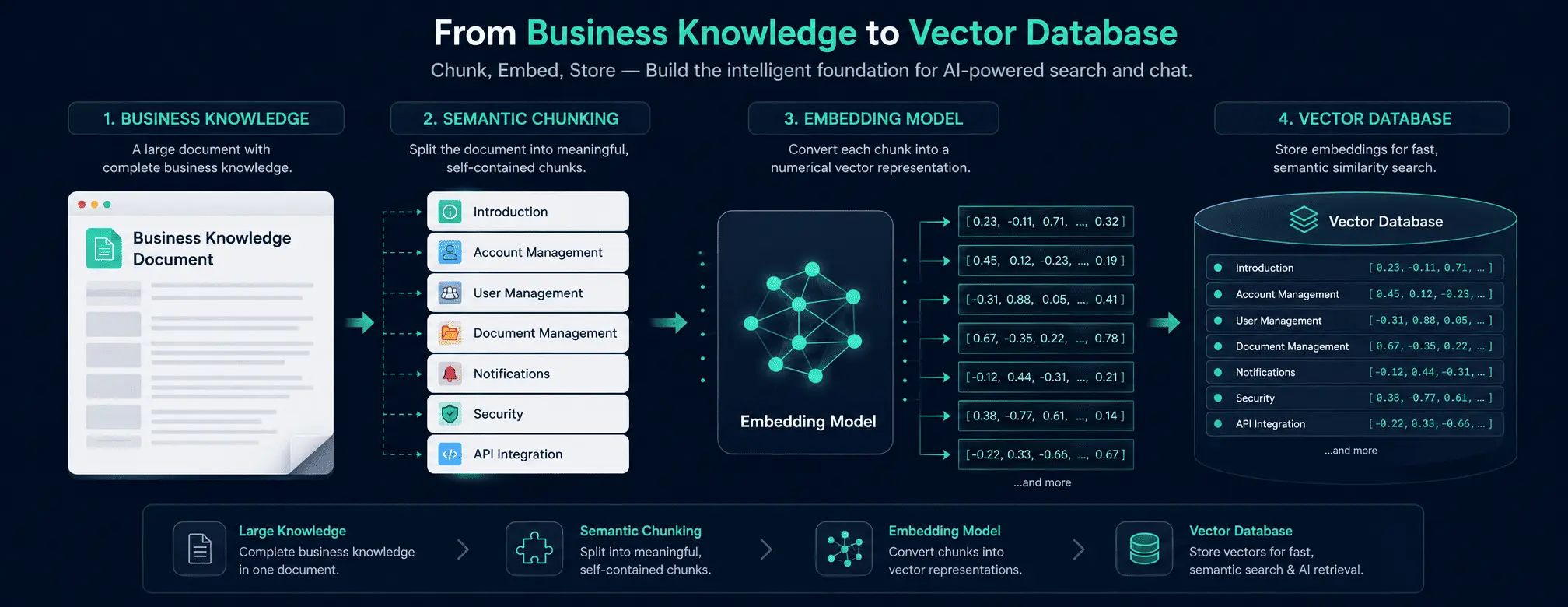
Instead, we divide the content into smaller, meaningful chunks.
For example, imagine a product document containing:
Product Documentation

Introduction

Account Management

User Management

Document Management

Notifications

Security

API Integration
Instead of embedding the entire document as one huge piece of text, we can create separate knowledge chunks.
Chunk 1 → Introduction

Chunk 2 → Account Management

Chunk 3 → User Management

Chunk 4 → Document Management

Chunk 5 → Notifications

Chunk 6 → Security

Chunk 7 → API Integration
Now each chunk can be searched independently.
Why Chunking Matters
Suppose a user asks:
"Does the platform support API integration?"
We don't need to retrieve the entire product documentation.
We want the section that discusses API integration.
This makes retrieval more precise and helps us control how much information eventually reaches the AI model.
The goal isn't to create the smallest possible chunks.
The goal is to create meaningful chunks that preserve enough context to make the information useful.
That balance is important.
Step 2: Generate Embeddings for the Knowledge
Once the content has been divided into chunks, we generate an embedding for each chunk.
Conceptually:
Knowledge Chunk
       ↓
Embedding Model
       ↓
Vector Representation
But we don't want to lose the original content.
So we associate the embedding with the actual knowledge content.
For example:
ID: 1024

Embedding:
[0.182, -0.091, 0.772, ...]

Content:
"Visitors can register online and receive
a QR-based entry pass..."
The embedding helps us find the content.
The original content gives the AI model the actual information it needs to generate the answer.
This distinction is important.
The vector is not the answer.
It is a representation that helps us locate the relevant answer within our knowledge base.
Step 3: Store the Knowledge in a Vector Database
After generating embeddings, we store them in a vector database.
The database effectively becomes a semantic index of our knowledge.
Conceptually:
┌─────────────────────────────────────┐
│ Knowledge Chunk                     │
│                                     │
│ ID: 1024                            │
│ Embedding: [0.182, -0.091, ...]     │
│ Content: "Visitors can register..." │
└─────────────────────────────────────┘

┌─────────────────────────────────────┐
│ Knowledge Chunk                     │
│                                     │
│ ID: 1025                            │
│ Embedding: [0.331, -0.201, ...]     │
│ Content: "QR passes are generated..."│
└─────────────────────────────────────┘
Now we have something much more useful than a traditional keyword-only search.
We have a way to search our knowledge based on semantic similarity.
Step 4: The User Asks a Question
Now let's look at what happens during an actual conversation.
Suppose the user asks:
"How do visitors get a QR pass?"
We don't immediately send the question and the entire knowledge base to the AI.
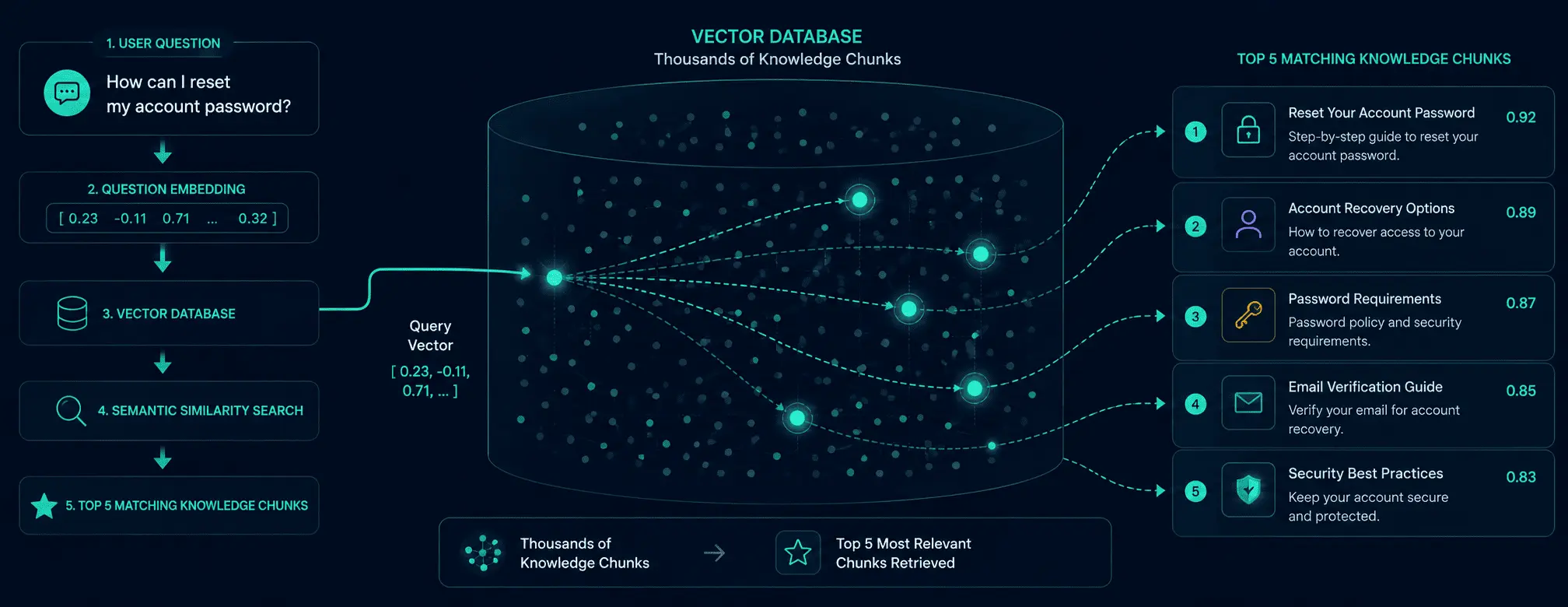
Instead, we first convert the question into an embedding.
User Question
      ↓
Embedding Model
      ↓
Question Vector
The question now has a vector representation that can be compared with the vectors stored in our database.
Step 5: Search the Vector Database
Now comes the interesting part.
We compare the question embedding against the knowledge embeddings stored in the vector database.
Imagine the search produces results like:
Chunk A → 0.94 similarity
Chunk B → 0.91 similarity
Chunk C → 0.88 similarity
Chunk D → 0.85 similarity
Chunk E → 0.82 similarity
Chunk F → 0.41 similarity
Chunk G → 0.29 similarity
The exact numbers are just an illustration, but the concept is important.
The system ranks the knowledge chunks based on how closely they match the meaning of the user's question.
Now we can select the best results.
Step 6: Retrieve Only the Top 4–5 Chunks
This is the most important part of our approach.
Once the vector search is complete, we don't send every matching result to the AI model.
We retrieve only the top 4–5 most relevant chunks.
For example:
Knowledge Base
      ↓
Thousands of Knowledge Chunks
      ↓
Semantic Search
      ↓
Top 4–5 Relevant Chunks
      ↓
AI Model
Suppose the retrieved information is:
Chunk 1:
Visitors can register online before the exhibition.

Chunk 2:
After completing registration, a QR-based visitor pass is generated.

Chunk 3:
The QR pass can be scanned at the exhibition entrance.

Chunk 4:
Visitors can access their pass from the registration confirmation.

Chunk 5:
Organizers can configure the visitor registration process.
That's all the AI needs for this particular question.
It doesn't need our entire knowledge base.
It doesn't need unrelated product documentation.
It doesn't need every support article.
It needs the small amount of information that is relevant to the current question.
This Is Where We Save Tokens
This is the central idea behind the architecture.
Without retrieval, the approach could look like:
Entire Knowledge Base
          ↓
          LLM
          ↓
        Answer
With embeddings and vector search:
Entire Knowledge Base
          ↓
    Vector Database
          ↓
    Semantic Search
          ↓
   Top 4–5 Chunks
          ↓
          LLM
          ↓
        Answer
The difference is significant.
The knowledge base can continue to grow, but we don't need to put all of it into every AI prompt.
Instead, we control the amount of context reaching the model.
That's the real optimization.
Step 7: Give the AI Only the Relevant Context
Once we've retrieved the top chunks, we construct the AI request.
A simplified version might look like:
SYSTEM:

You are an AI assistant.
Answer the user's question using the provided knowledge.
Do not invent information that is not supported by the provided context.


RELEVANT KNOWLEDGE:

[Chunk 1]

[Chunk 2]

[Chunk 3]

[Chunk 4]

[Chunk 5]


USER QUESTION:

How do visitors get a QR pass?
The AI model now has a focused context window.
Its job is no longer to search through thousands of documents.
The retrieval layer has already done that job.
The AI can concentrate on understanding the retrieved information and generating a natural response.
Retrieval and Generation Are Different Jobs
This is one of the most useful ways to understand a RAG-based chatbot.
There are really two different problems.
Retrieval
"Where is the information that can answer this question?"
That's the job of embeddings and vector search.
Generation
"How should we explain that information to the user?"
That's the job of the AI language model.
So our architecture looks like:
              RETRIEVAL
                  │
User Question → Embedding
                  ↓
            Vector Search
                  ↓
        Relevant Knowledge
                  │
                  ▼
              GENERATION
                  │
                  ↓
              AI Model
                  ↓
               Answer
Separating these responsibilities makes the overall system easier to understand and control.
Why Not Just Send the Entire Knowledge Base?
Someone might reasonably ask:
"Modern AI models can process very large context windows. Why not just send everything?"
There are several reasons.
1. Cost
Larger prompts can mean more input tokens and potentially higher API costs.
2. Efficiency
There is little value in processing information unrelated to the question.
3. Relevance
More information isn't necessarily better information.
4. Scalability
A knowledge base that works today with 100 documents may eventually contain 10,000 documents.
Building an architecture around "send everything" becomes increasingly difficult as the knowledge base grows.
5. Context Quality
A focused context can make it easier for the model to concentrate on the information relevant to the user's question.
So our philosophy is simple:
Don't give the AI more information. Give it better information.
What About Accuracy?
Token optimization is important, but accuracy is more important.
We don't want to save tokens by removing information that the AI actually needs.
That's why retrieval quality matters.
The system needs to find chunks that are:
Relevant
Meaningful
Sufficiently contextual
Related to the user's question
The goal isn't simply:
"Retrieve the smallest possible amount of text."
The goal is:
"Retrieve the smallest useful amount of information."
That distinction is important.
What If the User Asks Something We Don't Know?
This is another important part of a knowledge-based chatbot.
A good AI chatbot shouldn't pretend to know something that isn't available in its knowledge.
For example, suppose the knowledge base contains information about product features but nothing about a new pricing policy.
A user asks:
"What will your pricing be next year?"
If the knowledge base doesn't contain that information, the chatbot shouldn't invent a price.
Instead, the system should recognize that the available context isn't sufficient and respond appropriately.
This is one of the principles we consider important when designing knowledge-based AI systems:
If the knowledge isn't there, don't manufacture an answer.
RAG Makes Knowledge Updates Easier
Another advantage of this architecture is knowledge maintenance.
Suppose a company changes its refund policy.
With a traditional model-training approach, people may assume the AI needs to be retrained whenever knowledge changes.
With a retrieval-based architecture, the knowledge exists outside the language model.
We can update the relevant knowledge content and its associated embeddings.
The next time a user asks about the refund policy, the retrieval system can find the updated information.
This makes the architecture much more practical for business knowledge that changes regularly.
Embeddings Don't Replace the AI Model
It's also important to understand that embeddings and the LLM have different purposes.
The embedding model helps us answer:
"Which knowledge is relevant?"
The language model helps us answer:
"How should we respond?"
They complement each other.
Embedding Model
      ↓
Find Relevant Information
      ↓
Vector Database
      ↓
Relevant Context
      ↓
LLM
      ↓
Generate Human-Friendly Answer
This combination is what makes the system powerful.
Our Complete Chatbot Architecture
Putting the entire process together:
                KNOWLEDGE PREPARATION

 Documents / FAQs / Manuals / Business Knowledge
                         ↓
                  Text Chunking
                         ↓
                  Embedding Model
                         ↓
                  Vector Database
                         ↓
              Embedding + Actual Content


                 QUESTION ANSWERING

                    User Question
                         ↓
                Question Embedding
                         ↓
                 Vector Database
                         ↓
                Semantic Similarity
                         ↓
                 Top 4–5 Chunks
                         ↓
                  AI / LLM Model
                         ↓
                    Final Answer
The beauty of this architecture is its simplicity.
The vector database is responsible for finding.
The AI model is responsible for understanding and generating.
How This Approach Helps Control Token Usage
The main benefit is that we have control over the context sent to the AI.
We control:
How content is chunked
How content is embedded
How many results are retrieved
Which results are considered relevant
How much context is passed to the model
For our implementation, we intentionally retrieve only the top 4–5 relevant chunks instead of sending the entire knowledge base.
This doesn't mean that every chatbot will achieve the same token savings.
Actual token consumption depends on:
Knowledge chunk size
Number of retrieved chunks
Prompt length
Conversation history
User question length
AI model
Response length
Embedding model
Retrieval strategy
So we don't look at token optimization as simply:
"Use fewer tokens."
We look at it as:
"Avoid spending tokens on information the model doesn't need."
A Simple Example
Let's make the difference concrete.
Imagine our knowledge base contains:
10,000 knowledge chunks
A user asks:
"How do visitors receive their QR pass?"
We could theoretically provide a huge amount of information to the AI.
Instead:
10,000 Knowledge Chunks
          ↓
    Vector Search
          ↓
   Top 5 Chunks
          ↓
      AI Model
          ↓
       Answer
The model doesn't need to know that there are 10,000 chunks.
It only needs the five pieces of information that help answer the current question.
That is the fundamental idea.
What We Learned Building This
The most important lesson wasn't about a particular AI model or vector database.
It was about information architecture.
When we first think about AI, it's tempting to think:
"How much information can we give the model?"
But for production systems, another question is often more important:
"What is the minimum relevant information the model needs to do its job correctly?"
That shift in thinking changes the architecture.
Instead of:
Knowledge → AI
we build:
Knowledge
   ↓
Search
   ↓
Relevant Context
   ↓
AI
And that makes a big difference.
The Bigger Picture: From Chatbot to AI Automation
A knowledge-based chatbot is only one part of what can be built around this architecture.
Once a business has a reliable knowledge retrieval layer, it can become the foundation for other capabilities such as:
AI customer support
Employee knowledge assistants
Product assistants
Technical support
AI ticket creation
Lead qualification
Human-agent handoff
Workflow automation
Business process assistance
The important part is that the AI has access to controlled, business-specific knowledge rather than relying only on generic information.
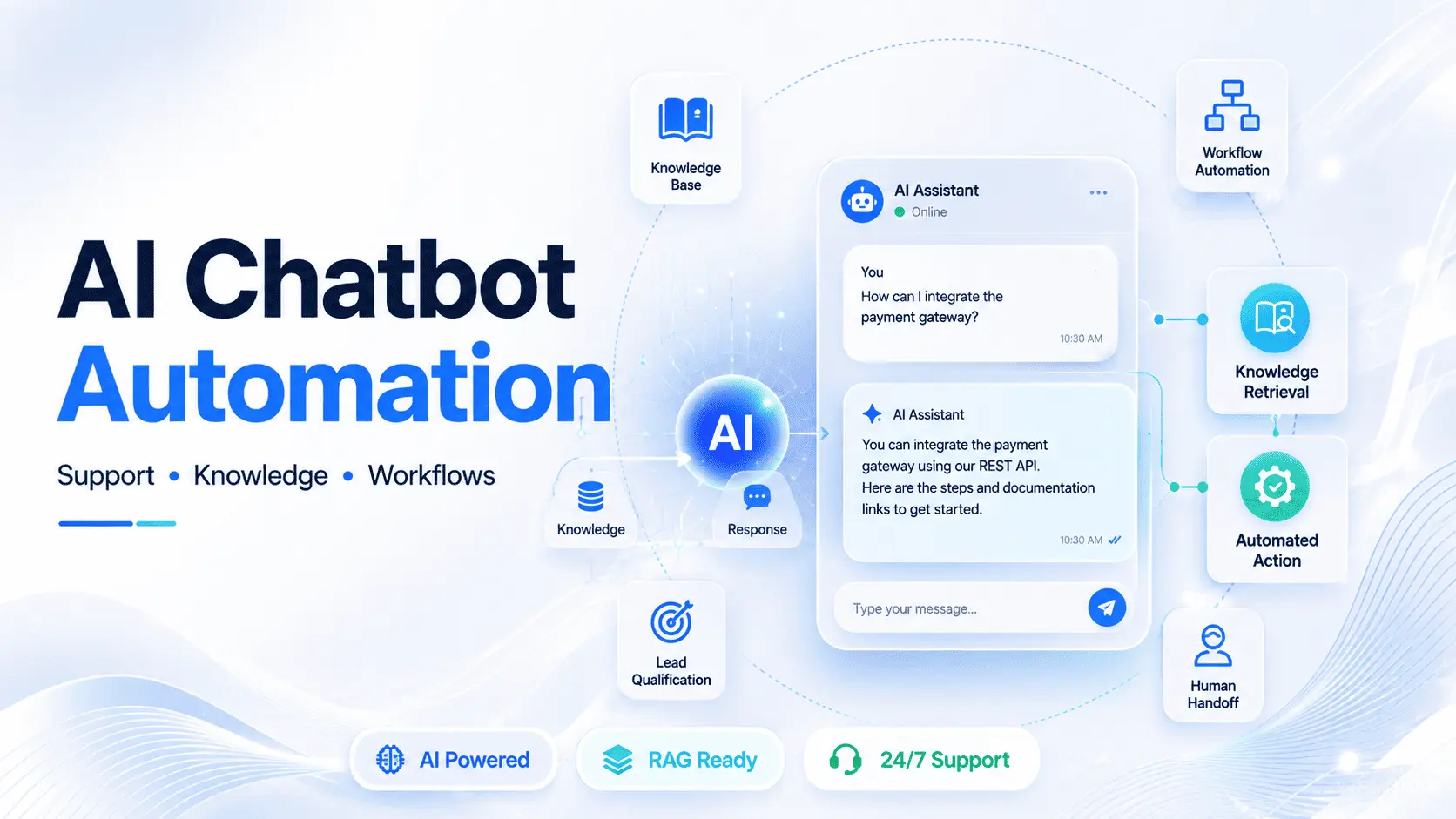
Our own AI Chatbot & Automation Platform follows this broader idea: connect business knowledge with conversational AI and then extend those conversations into support and automation workflows.
Final Thoughts
Building an AI chatbot isn't simply about connecting an application to GPT, Gemini, or another language model.
The more interesting engineering challenge is deciding what information should reach the model.
Our approach is straightforward:
Build a business knowledge base.
Divide the knowledge into meaningful chunks.
Generate embeddings for those chunks.
Store the embeddings together with the original content in a vector database.
Convert every user question into an embedding.
Search the vector database for semantically similar knowledge.
Retrieve only the top 4–5 relevant chunks.
Give those chunks to the AI model.
Let the AI generate the final response.
In other words:
We don't send the entire knowledge base to AI. We search it first.
That simple architectural decision can make an AI chatbot more efficient, more scalable, and easier to manage as the knowledge base grows.
And perhaps the biggest lesson is this:
Better AI doesn't always mean giving the model more information. Sometimes, it means giving the model less — but making sure that what you give it is exactly what it needs.